
DPRK
Case Studies
News
DPRK's Dangerous Password and How to Avoid Their Tactics
Oct 9, 2025 | 5 min read
North Korea’s “DangerousPassword” hackers stole $185M in 2025 using fake VC calls and malware; zeroShadow warns and shares defense steps.

If you track crypto-focused threat actors, you’ve likely seen headlines of large heists linked to the North Korean-linked group DangerousPassword. There have been at least 17 successful thefts associated with Dangerous Password since the start of 2025. In this ever changing world of crypto, it's important to understand how this group operates. In this article we will discuss the tactics, the financial motives, and how they conduct these attacks.
Who is DangerousPassword?
With origins as early as 2018 , DangerousPassword Group is known for highly sophisticated cyber attacks. Often used as an umbrella term, this group is linked to the overarching North Korean Lazarus Group. Their goal is to use malicious links/cyber attacks to obtain financial information, passwords, seed phrases, and in general any secret information that they can access to. In 2025, Dangerous Password has already stolen $185M USD.
DangerousPassword aliases
SquidSquad, CryptoCore, APT38, Bluenoroff, Alluring Pisces, Leery Turtle, SnatchCrypto, CryptoMimic, UNC1069, Black Alicanto.
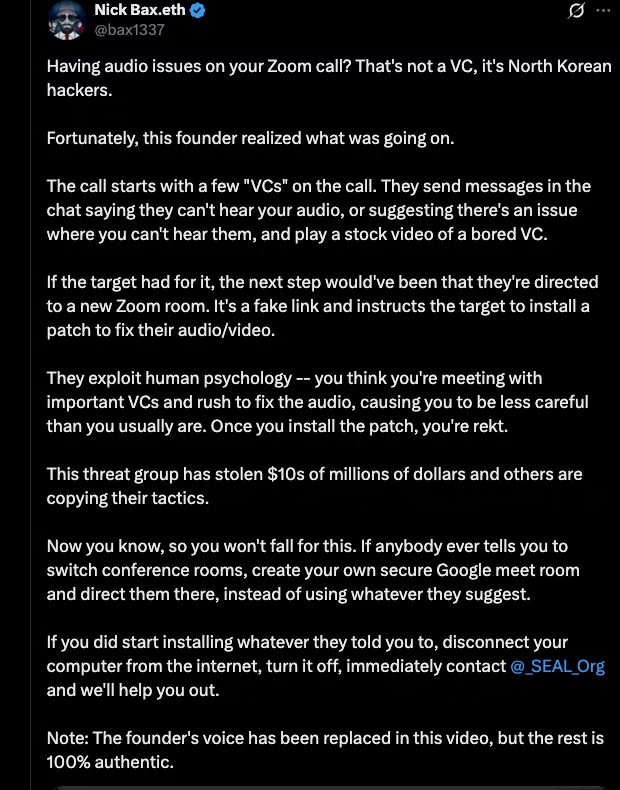
Crypto security analysts have documented this group on X
Who is getting targeted by DangerousPassword?
DangerousPassword usually targets wealthy individuals. They are often in top positions of the company such as CEO, CFO, COO, etc. Victims are often targeted through social engineering/spearphishing emails, LinkedIn emails, or Telegram messages.
In many thefts, DPRK will impersonate Venture Capitalists (VCs), posing as an employee that works at the VC. Initial invitations offer a chance for victims to work together on a new product or solution.
How do they deliver the malware?
The following infographic summarizes the step by step process in which the threat actors typically perform.
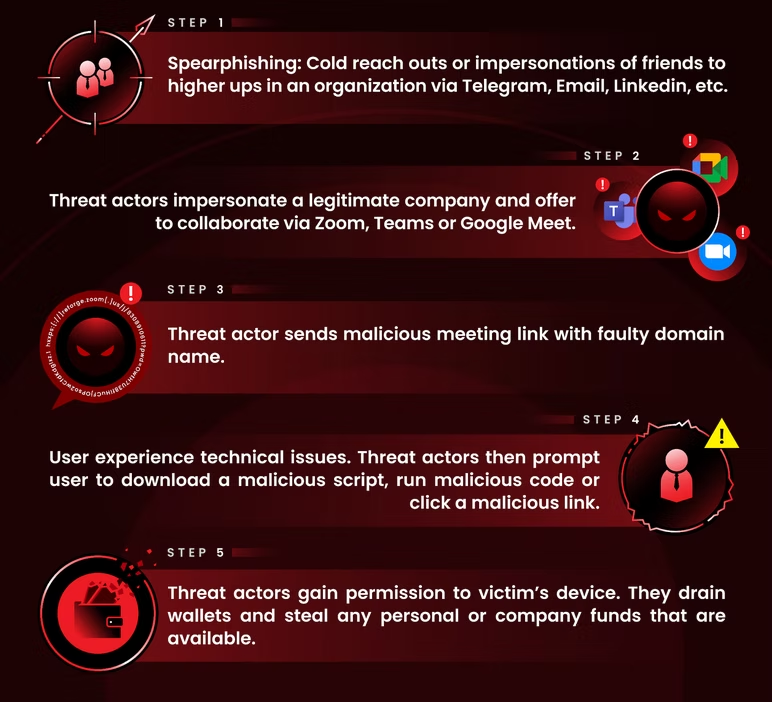
Threat actors will start a dialogue impersonating a member of the C-suite and schedule a meeting on Google Meet, Teams, or Zoom. On all ends the messages appear legitimate, with no alerts raised. However, once clicking the accept link, the victim is unable to join the call or experiences technical issues (audio, visual, etc). Other times there will be a message the meeting is “restricted” along with a faulty domain name (Example: 'support[.]internal-meeting[.]site').
When the victim questions what is going on, the threat actor offers solutions such as a step-by-step guide on how to resolve the issue. It is at this point that the threat actor will ask the victim to run code in the command line interface and ultimately deliver the malware to the victim's device. Here are a few stories that highlight this very issue:
Individual victim Spring 2024
We had a chance to speak to a victim who wishes to remain anonymous. The victim described meeting a VP from a venture capital firm in Kuala Lumpur via mutual contacts. They had chatted and met in real life. Then, a few months later, this VP asked for a meeting and sent a Microsoft Teams link for the call (defanged for this article):
hxxps[://]foresight[.]team-meets[.]site/roundtable-talk-with-foresight-team/roomID=3570947&meetingID=0918108
A message appeared saying that there was an issue with their IP/Location and the “VP” sent a link to fix the issue. Soon after following the steps, AppleScript was infiltrated with malware. It turns out that the real VP had been hacked by North Korea, and this victim did not know.
Individual victim Spring 2025
An individual was approached by a known venture capitalist friend on Telegram. It turns out that their friend’s Telegram was previously hacked by North Korea. The attacker, posing as the friend, asked for an urgent meeting and sent a link for the call (defanged for this article):
hxxps:{://]reforge.zoom[.]us/j/8308910611?pwd=OwtH7U38fiHuCFjOPso2wCfdKdglxz.1
Once they clicked on the meeting, the individual experienced audio issues and was given specific repair instructions for his location, which was already known by the “friend.” The repair instructions downloaded malware and they lost personal funds.
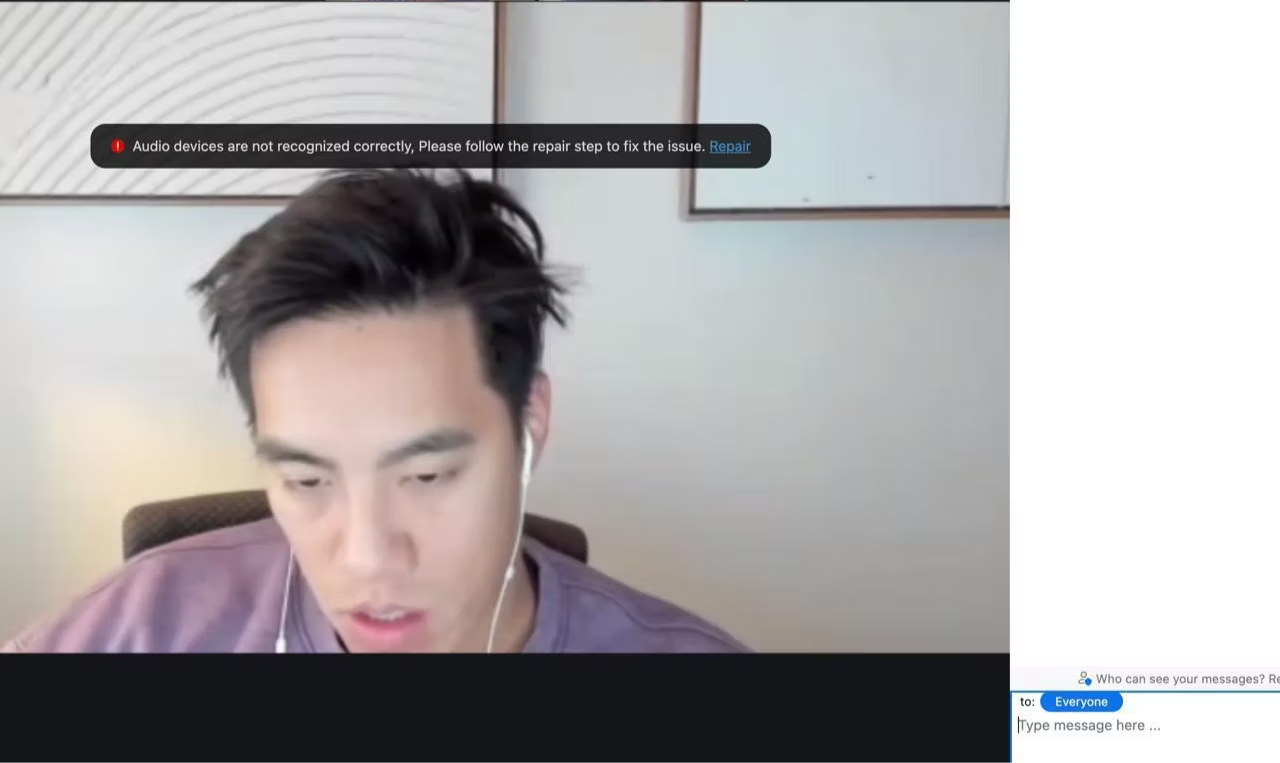
However, not all attacks are the same
Sometimes, victims are prompted to download a file named IP_Request.scpt which contains malware and likely will compromise the victim’s device. Other attacks include inserting malicious code into a file named builder.py in the Python module , which is for handling QR codes. These affect all system environments including Windows, macOS, and even Linux.
The scary fact about Dangerous Password is that this malicious group is always evolving. Though the pattern remains the same, it's important to know how they’ve adapted and changed how they’ve targeted victims.
If Targeted, what should you do?
If you are targeted. It’s important to remain calm and follow some immediate steps:
- Turn off your compromised device(s) and disconnect from WiFi completely
- Prioritize saving any remaining assets, starting with the wallets with the highest value and begin transferring them to a newly created wallet
- Rotate your passwords and disconnect any existing social media or Telegram sessions
- Report what happened to zeroShadow or SEAL911
- Notify friends and/or colleagues as they may try and use the stolen information to impersonate them
File a report
If you find unauthorized transactions or suspicious activity, please file a report as soon as possible.
- IC3 (even if you aren’t a US citizen): https://www.ic3.gov/
- Your local law enforcement office
History, Indicators, and Resources
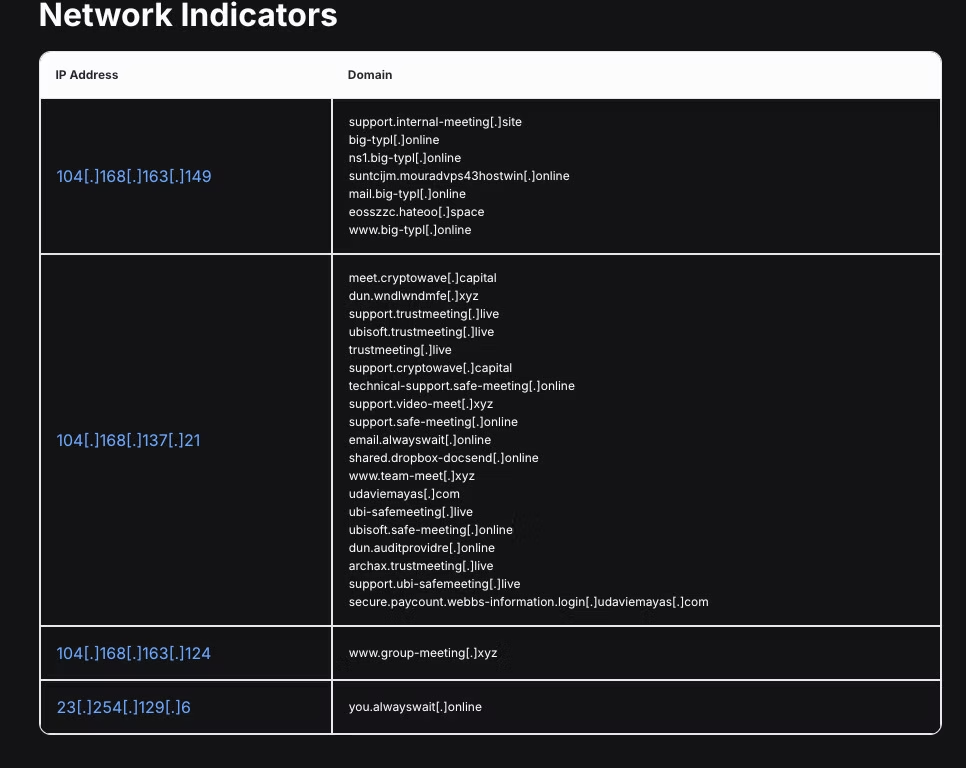
There have been many posts about DangerousPassword from security analysts. Here is a great blog post by Hunt.io with some indicators you might be dealing with North Korean Threat Actors. Note that these tactics always evolve over time.
- Hostwinds ASN dedicated servers
- Let'sEncrypt SSL certificates
- Namecheap (among others) for domain registrars
- HTTP response hash *403 & 404
Other articles:
- ClearSky. “CryptoCore Group.” ClearSky Cyber Security, 24 June 2020, Accessed 27 Aug. 2025. ClearSky Cyber Security
- ClearSky Research Team. “CryptoCore Group.” ClearSky (PDF), June 2020, Accessed 27 Aug. 2025. ClearSky Cyber Security
- Council on Foreign Relations. “Targeting of Cryptocurrency Exchanges in DangerousPassword Campaign.” CFR Cyber Operations Tracker, May 2023, Accessed 27 Aug. 2025. Council on Foreign Relations
- Ilascu, Ionut. “North Korean Hackers Behind CryptoCore Multi-Million Dollar Heists.” BleepingComputer, 24 May 2021, Accessed 27 Aug. 2025. BleepingComputer
- JPCERT/CC. “Attack Trends Related to DangerousPassword.” JPCERT/CC Blog, 12 May 2023, Accessed 27 Aug. 2025. JPCERT/CC Eyes
- JPCERT/CC. “DangerousPassword Attacks Targeting Developers of Cryptocurrency Exchange Businesses.” JPCERT/CC Blog, 19 July 2023, Accessed 27 Aug. 2025. JPCERT/CC Eyes
- “Someone Has Been on a $200M Crypto Exchange Hacking Spree.” CoinTelegraph, 24 June 2020, Accessed 27 Aug. 2025. Cointelegraph
Original article by the zeroShadow team